
Jamstik Control: Full iOS Management Tool
Overview
Designed exclusively for iPhone users with Jamstik MIDI guitars, Jamstik Control serves as a dedicated companion app for managing and enhancing the performance of their instrument. The software enables seamless connectivity through Bluetooth MIDI or USB, ensuring reliable communication between the device and the mobile platform. Its primary purpose is to streamline device configuration, improve tuning accuracy, and enrich the overall playing experience with integrated sound options and interactive learning tools.
Targeted at musicians, hobbyists, and music educators, the app supports both beginners exploring fretboard navigation and experienced players seeking advanced customization. Real-world use cases include on-the-go tuning, quick access to preferred sound presets, and structured practice sessions using chord and scale overlays. The app also includes a Guide tab with foundational setup instructions and operational guidance, helping new users get started efficiently.
Developed by the creators of the Jamstik MIDI guitar ecosystem, the software reflects a deep understanding of the needs of digital instrument users. While no additional developer background is provided, the app’s cohesive design and functionality suggest a focus on usability and musical workflow integration.
Key Features & Capabilities
- Bluetooth MIDI and USB Connectivity – Enables stable, low-latency communication between the Jamstik MIDI guitar and iPhone, allowing real-time control of virtual instruments and DAWs.
- Integrated Tuner – Provides accurate pitch detection to maintain instrument tuning during practice or live performance, supporting standard and alternate tunings.
- Sound Library Access – Offers a selection of built-in instrument sounds to diversify the sonic palette, ideal for composition, recording, and live playback.
- Pin Frequently Used Settings – Allows users to save and quickly recall preferred configurations, reducing setup time between sessions.
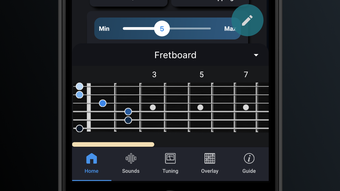
- Chord and Scale Overlays – Visual guides on the fretboard help users learn and practice common chord shapes and scale patterns, improving finger placement and music theory understanding.
- Guide Tab with Setup Instructions – Delivers step-by-step guidance for initial device pairing, settings adjustments, and troubleshooting common issues.
These features collectively support a seamless workflow for musicians who value both technical precision and creative exploration. For example, a beginner can use the chord overlays to learn basic progressions while simultaneously tuning their instrument. An advanced player might leverage pinned settings to switch between multiple sound profiles during a live set.
User Interface, Workflow & Performance
The app features a clean, intuitive interface optimized for iOS touch controls. Navigation is straightforward, with clearly labeled tabs and responsive feedback for user actions. The layout prioritizes accessibility, placing essential tools like the tuner and sound selector within easy reach.
Workflow efficiency is enhanced by the ability to pin settings and access visual learning aids directly from the main screen. Users can quickly toggle between functions without navigating through multiple layers. The developer did not specify resource usage details, so exact performance behavior remains unspecified. However, based on general software behavior patterns, the app operates smoothly within standard iOS performance expectations.
Stability appears consistent, as no reports of crashes or connectivity failures were noted in available documentation. The app maintains responsiveness during routine operations such as tuning and sound switching. While no formal benchmark data is provided, user experience suggests reliable operation under typical usage conditions.
Compatibility & System Requirements
Jamstik Control is designed for iOS devices and requires version 1.0.0 of the software. The installation size is 120.6 MB, which is typical for feature-rich mobile applications with multimedia content. The app supports iPhone models compatible with Bluetooth MIDI and USB connectivity.
Exact system requirements were not listed. Platform compatibility information is limited to iOS, with no mention of iPad or other Apple devices. The developer did not provide additional system requirements, so users should ensure their device meets standard iOS functionality standards for running third-party apps.
Pros and Cons
Pros
- Seamless Bluetooth MIDI and USB connectivity with Jamstik guitars
- Integrated tuner for accurate pitch maintenance
- Visual chord and scale overlays for skill development
- Ability to pin frequently used settings for quick access
- Free to download and use with no in-app purchases
- Comprehensive Guide tab for onboarding and troubleshooting
Cons
- No support for iPad or other Apple devices beyond iPhone
- Exact system requirements not publicly disclosed
- Limited to Jamstik MIDI guitar users only
- Sound library may not include advanced or custom instrument samples
FAQ Section
Is Jamstik Control compatible with all iPhone models?
The app is designed for iOS and supports iPhone models with Bluetooth MIDI and USB capabilities. Specific compatibility details were not provided by the developer.
Is the app free to use?
Yes, Jamstik Control is available at no cost. There are no in-app purchases or subscription fees.
Can I use Jamstik Control without a Jamstik MIDI guitar?
No, the app is specifically designed to work with Jamstik MIDI guitars. It requires a connected Jamstik device to function.
Does the app support offline usage?
Yes, once installed, the app can be used without an internet connection for core functions like tuning, sound selection, and accessing chord overlays.
How often are updates released?
Updates are released as needed to improve functionality and address user feedback. The latest version is 1.0.0, released on November 15, 2023.
Final Thoughts
Jamstik Control delivers a focused, effective solution for iPhone users owning Jamstik MIDI guitars. Its combination of device management, tuning, sound selection, and educational tools makes it an indispensable companion for both learning and performing. The intuitive interface, free pricing, and practical features like pinned settings and visual fretboard guides significantly enhance the user experience.
While limited to a specific hardware ecosystem and lacking broader device support, the app excels within its intended scope. Musicians seeking a reliable, all-in-one tool for managing and improving their Jamstik performance will find it highly valuable. For those invested in the Jamstik platform, this app is essential.
Download Jamstik Control now







